


The Problem: E-mail Overload Is Real
E-mail overload is a widely underestimated problem in both professional and personal life. Between newsletters, automated notifications and meeting invitations, the inbox quickly turns into a continuous stream that is hard to prioritise.
Each week, I was spending a significant amount of time sorting through these messages, without being able to efficiently extract the information that actually mattered. Traditional filtering rules quickly reach their limits as soon as the volume or diversity of content increases.
I therefore set up a workflow based on n8n and an AI service operated in a sovereign environment, capable of analysing e-mail content, classifying it semantically and producing actionable summaries, without any manual intervention.
The Solution: My AI-Powered E-mail Triage Workflow
Here’s how I built a system that:
- Automatically classifies incoming e-mails
- Moves newsletters to a dedicated folder
- Summarises them every Monday at 7 AM
- Sends me a clean, digestible summary no scrolling required
All powered by n8n, with Infomaniak sovereign AI Services nodes doing the heavy lifting.
🛠️ How It Works (Step by Step)
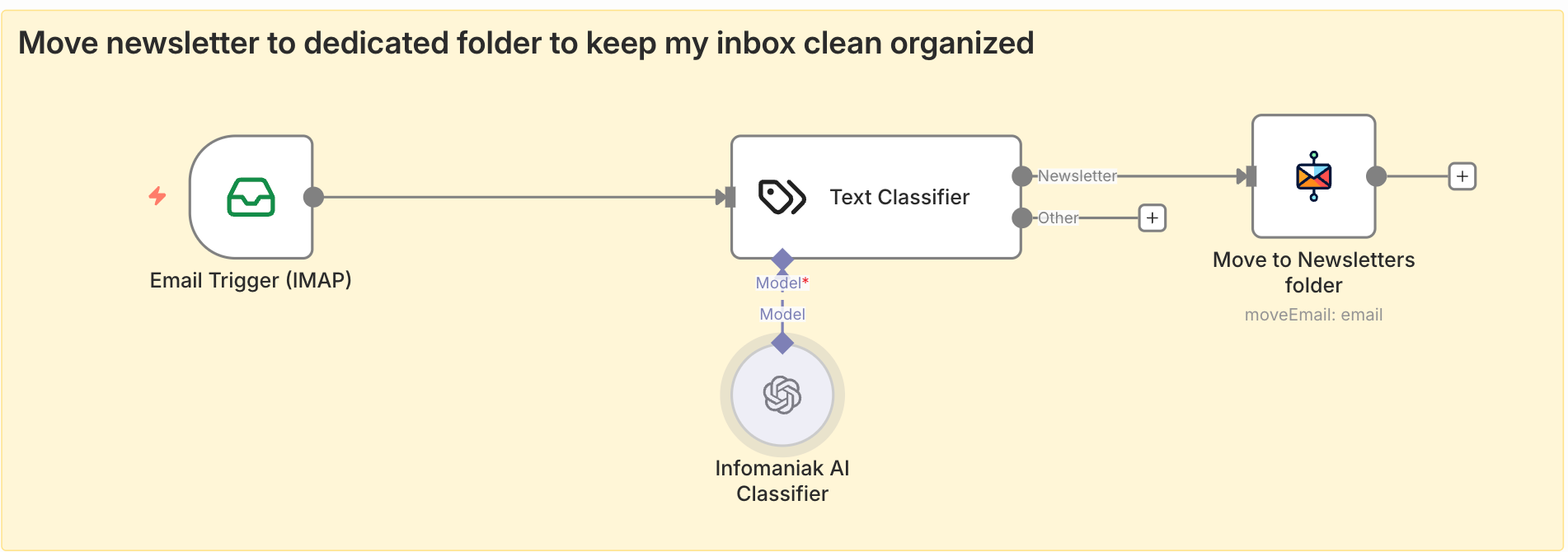
Step 1: Trigger when new E-mail Arrives
I use the IMAP Trigger node in n8n to monitor my inbox. Whenever a new e-mail arrives in Infomaniak Mail, the workflow kicks off.
Pro Tip: Use filters (like “unread”) in the workflow to avoid triggering on every single e-mail.
Step 2: AI Classification is this a Newsletter?
This is where the magic begins.
I use an AI Text Classifier n8n node to send the e-mail to our AI service. No need to get bored writing a prompt, simply write your category and the work is done! For this task I chose the openai/gpt-oss-120b opensource model as it's pretty good for reasoning and relatively fast.
If the AI returns “Newsletter”, the workflow continues. Otherwise, it stops letting me handle those manually or route them elsewhere.
Step 3: Move to “Newsletters” Folder
If classified as a newsletter, the IMAP Move Message node kicks in, moving the e-mail to a dedicated folder: Newsletters.
This keeps my primary inbox clean and focused on what needs immediate attention.
Step 4: Monday Morning Summary (7 AM)
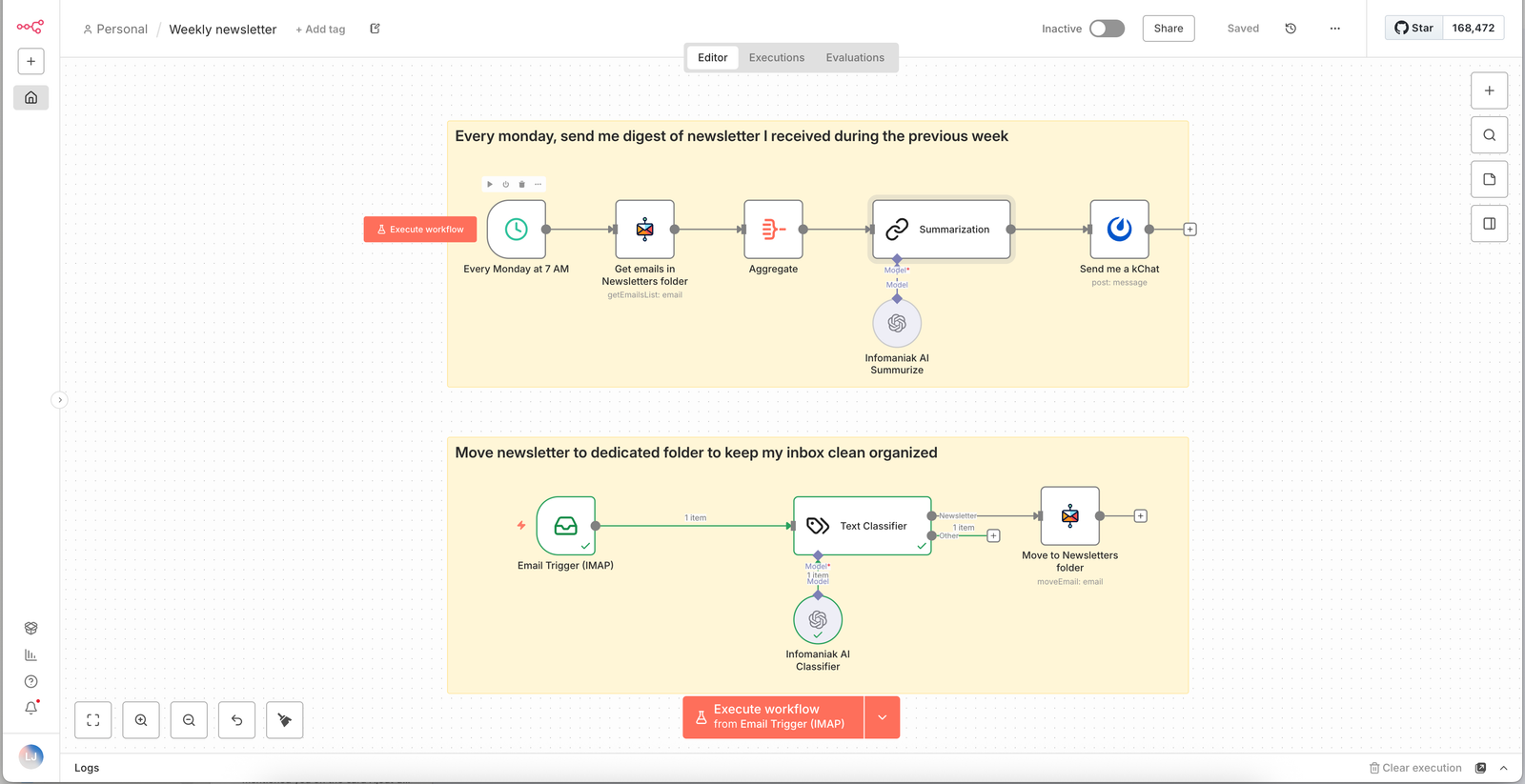
This part runs on a Schedule Trigger every Monday at 7 AM.
The workflow:
- Search IMAP for all e-mails in the
Newslettersfolder received since last Monday. - Aggregate those e-mail and send its content to the AI for summarisation.
- Compile summaries into a single, clean markdown report.
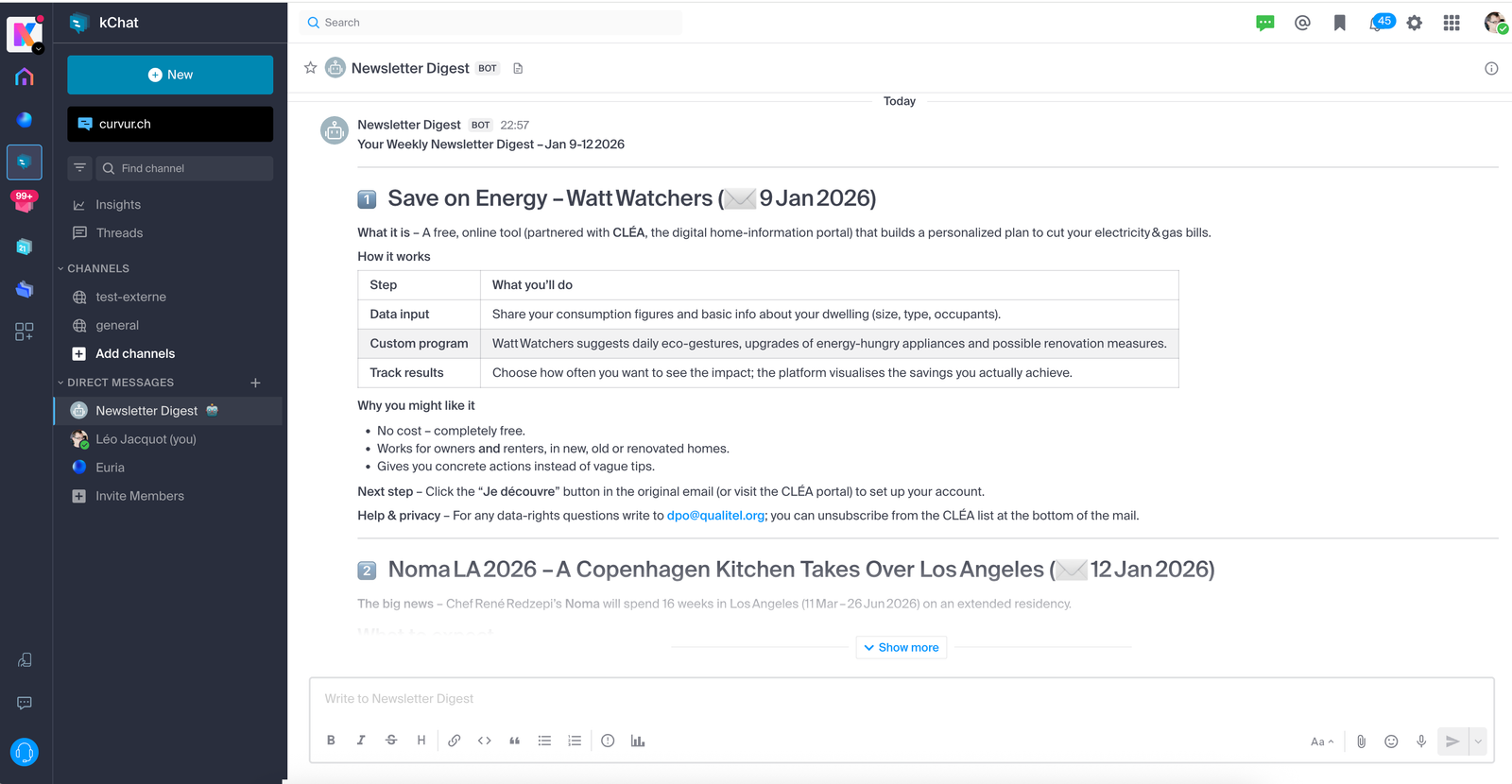
- Send me a message on Infomaniak kChat with the digest using a bot.
Here’s an example of the AI prompt for summarisation:
“You are a helpful assistant. Here is a list of newsletters I received during the previous week. Write me a post that will be sent to me with a summary.”
Pro Tip: Give the current day information to the LLM to improve efficiency!
📈 The Results
Since implementing this system:
- I have saved on e-mail triage
- I actually read newsletters now because I get the gist in seconds
- My inbox stays clean no more “I’ll get to this later” e-mails piling up
- I’ve reduced decision fatigue the AI does the sorting and summarising for me
🚀 What’s Next?
With the same workflow, you can take this much further:
- Auto-tag newsletters by topic (Tech, Marketing, Finance)
- Generate a weekly “Top 3” newsletter ranking based on relevance
- Delete those e-mails after 1 month
🙋♂️ Want to Try It Yourself?
I’ve shared my n8n workflow on GitHub:
👉 https://github.com/Infomaniak/n8n-templates/blob/main/Weekly%20newsletter.json
✍️ Final Thoughts
Automation isn’t about replacing human judgment it’s about freeing up your time to focus on what matters. With n8n and AI, I’ve turned my inbox from a stress-inducing black hole into a curated, intelligent information hub.
If you’re drowning in e-mails give this a try. You’ll wonder how you ever lived without it.
Enjoy the read. This article was written by Léopold Jacquot, Principal Engineer at Infomaniak. If you’d like to connect or follow my work, you can find me on GitHub or LinkedIn.