How the vLLM V1 Engine Works
A practical, code-level walkthrough of vLLM V1 internals — from startup to token generation.
Demonstrated with Qwen3.5-0.8B on a laptop with an NVIDIA RTX 3080 Ti.
We used Vllm version v0.18.0
Why This Guide?
The best thing to describe vLLM is easy to start but hard to master.
Disclaimer: The goal of this series is to highlight the key components of modern, production-grade LLM usage. Because vLLM is a rapidly evolving project, this guide isn't meant to be an exhaustive, line-by-line breakdown of the source code. Instead, the aim is to give you the conceptual tools and structural understanding you need to follow vLLM's future evolution and updates on your own.
vLLM is one of the most widely used inference engines for large language models, but its internals can feel like a black box.
This guide changes that. We walk through the actual source code — function by function, hop by hop — to show exactly what happens when you send a chat completion request and vLLM returns tokens. By the end, you'll understand:
- How vLLM allocates GPU memory at startup and why it never grows
- The full lifecycle of a request, from HTTP POST to sampled token
- How the scheduler decides what to compute on each GPU step
- Why decode steps are O(1) through the model (thanks to the KV cache)
- Where tuning parameters like
--gpu-memory-utilizationand--max-num-batched-tokensactually take effect in the code
All code references link directly to the vLLM source so you can follow along.
Starting command used throughout this guide:
python3 ./vllm/entrypoints/openai/api_server.py \
  --model Qwen/Qwen3.5-0.8B \
  --port 8000 \
  --tensor-parallel-size 1 \
  --dtype auto \
  --gpu-memory-utilization 0.85 \
  --max-model-len 1024 \
  --language-model-only \
  --enable-auto-tool-choice \
  --tool-call-parser qwen3_coder \
  --reasoning-parser qwen3 \
  --enable-chunked-prefill \
  --enable-prefix-caching \
  --async-scheduling
And the start query send for this guide will be:
curl -X POST 'http://localhost:8000/v1/chat/completions' \
  --header 'Content-Type: application/json' \
  --data '{
  "stream": false,
  "temperature": 0.7,
  "max_tokens": 150,
  "messages": [
    {
      "role": "user",
      "content": "Quel temps fait-il à Paris aujourd\'hui ?"
    }
  ],
  "chat_template_kwargs": {
    "enable_thinking": false
  },
  "tool_choice": "auto",
  "tools": [
    {
      "type": "function",
      "function": {
        "name": "q",
        "description": "Get the current weather for a specific location.",
        "parameters": {
          "type": "object",
          "properties": {
            "x": {
              "type": "string",
              "description": "The city and country, e.g., Paris, France"
            }
          },
          "required": [
            "x"
          ],
          "additionalProperties": false
        },
        "strict": true
      }
    }
  ]
}'
In this guide, we want to show the tool parser—or thinking parser—to keep the menu light.
Architecture Overview
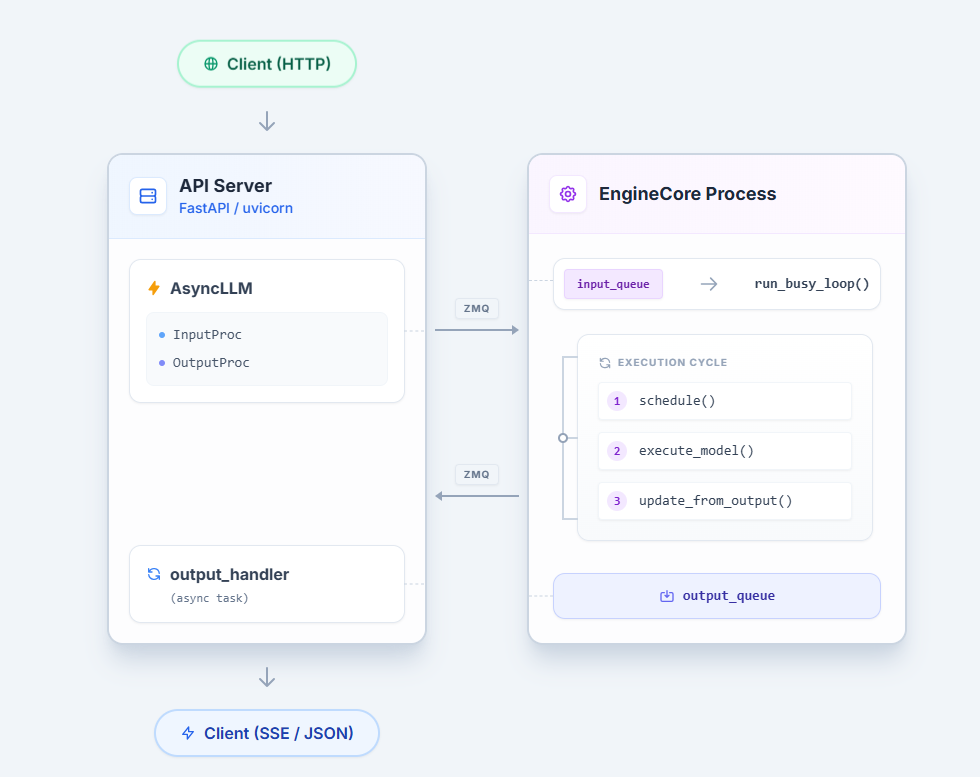
Every token vLLM generates follows the same path: an HTTP request enters
the API server, crosses a process boundary into the EngineCore, gets picked up
by the Scheduler, receives KV cache memory, runs through a GPU forward pass,
and the sampled token travels back to the client. Understanding this pipeline — and where
the bottlenecks live — is the foundation for every tuning decision you will make.
The Big Picture
The Core Components
| Component | File | Responsibility |
|---|---|---|
| EngineCore | vllm/v1/engine/core.py |
Orchestrates the loop: poll inputs, call scheduler, dispatch to GPU, return outputs |
| Scheduler | vllm/v1/core/sched/scheduler.py |
Decides which requests run this step and how many tokens each gets |
| KVCacheManager | vllm/v1/core/kv_cache_manager.py |
Allocates and frees GPU memory blocks for each request's KV cache |
| GPUModelRunner | vllm/v1/worker/gpu_model_runner.py |
Prepares tensors and runs the actual model forward pass |
These four form a tight loop that executes once per "step." Each step
processes a batch of requests together — some doing their first prefill, some
continuing decoding, some being preempted — all in a single GPU forward pass.
This is the heart of continuous batching.
The EngineCore runs in a dedicated process communicating over ZMQ sockets (vllm/v1/engine/core.py:EngineCoreProc). The API server's async event loop and the GPU-bound engine loop never contend for the GIL. Background threads in the EngineCore handle ZMQ I/O, releasing the GIL to overlap serialization with GPU execution.
Startup: KV Cache Pre-Allocation
Before any request is served, vLLM decides how much GPU memory to reserve
for the KV cache and pre-allocates all of it upfront. This happens once during
EngineCore._initialize_kv_caches() (CODE). The process has four stages.
We won't go deep into KV cache internals here — that deserves its own post.
The goal is to understand the initialization flow and where--gpu-memory-utilizationfits in.
Stage 1: Compute the Memory Budget
vLLM calculates how much total GPU memory it is allowed to use CODE:
# vllm/v1/worker/utils.py – request_memory (line 408)
requested_memory = math.ceil(
    init_snapshot.total_memory * cache_config.gpu_memory_utilization
)
With --gpu-memory-utilization 0.85 on a 12 GB RTX 3080 Ti, this is
roughly 12 GB × 0.85 ≈ 10.2 GB.
This memory reservation is very important because, in multimodal LLMs like Qwen3.5, images can produce heavy memory spikes that we can estimate during vLLM engine startup.
Stage 2: Profile the Model
A dummy forward pass measures peak memory usage of the model weights,
activations, and CUDA graphs to estimate the memory spikes CODE:
# vllm/v1/worker/gpu_worker.py – determine_available_memory (line 366)
with memory_profiling(self.init_snapshot, weights_memory=...) as profile_result:
    self.model_runner.profile_run()          # dummy forward pass
    cudagraph_memory_estimate = self.model_runner.profile_cudagraph_memory()
The available KV cache memory is everything left over CODE:
# gpu_worker.py (line 417)
available_kv_cache_memory = (
    requested_memory                    # total_gpu × 0.85
    - non_kv_cache_memory               # model weights + peak activations
    - cudagraph_memory_estimate         # CUDA graph capture overhead
)
In short:
total_gpu_memory × gpu_memory_utilization
  − model_weights
  − peak_activations
  − cuda_graph_overhead
  = available_kv_cache_memory
Stage 3: Divide Into Blocks
The available memory is divided by the per-block size to determine
num_blocks — the total number of KV cache pages CODE:
# vllm/v1/core/kv_cache_utils.py – get_kv_cache_config_from_groups (line 1113)
num_blocks = (
    available_memory // kv_cache_groups[0].kv_cache_spec.page_size_bytes
)
page_size_bytes is the memory cost of one block across all layers:
page_size_bytes = block_size × num_kv_heads × head_size × 2(K+V) × dtype_bytes
                  summed across all attention layers
For Qwen3.5-0.8B, only the full_attention layers contribute to this sum
(the linear_attention layers use Mamba state, managed separately).
Stage 4: Allocate and Bind
Once num_blocks is known, tensors are allocated on the GPU and bound
to each Attention layer (CODE):
kv_cache_raw_tensors = self._allocate_kv_cache_tensors(kv_cache_config)
kv_caches = self._reshape_kv_cache_tensors(kv_cache_config, kv_cache_raw_tensors, kernel_block_sizes)

bind_kv_cache(
    kv_caches,
    self.compilation_config.static_forward_context,
    self.kv_caches,
    num_attn_module,
)
The binding makes the cache directly accessible to the model runner via the forward context (CODE):
for layer_name, kv_cache in kv_caches.items():
    forward_context[layer_name].kv_cache = kv_cache
Complete Call Chain
EngineCore._initialize_kv_caches()                    # core.py:229
  │
  ├─ model_executor.determine_available_memory()
  │    └─ gpu_worker.determine_available_memory()      # gpu_worker.py:332
  │         ├─ request_memory()                        # utils.py:408
  │         │    = total_gpu_memory × gpu_memory_utilization
  │         ├─ profile_run()                           # dummy forward pass
  │         ├─ profile_cudagraph_memory()
  │         └─ available = requested − weights − activations − cudagraphs
  │                                                    # gpu_worker.py:417
  │
  ├─ get_kv_cache_configs()                            # kv_cache_utils.py:1508
  │    └─ get_kv_cache_config_from_groups()            # kv_cache_utils.py:1081
  │         └─ num_blocks = available_memory // page_size_bytes
  │
  └─ model_executor.initialize_kv_cache()
       └─ gpu_model_runner.initialize_kv_cache()       # gpu_model_runner.py:6758
            ├─ _allocate_kv_cache_tensors()            # raw GPU byte tensors
            ├─ _reshape_kv_cache_tensors()             # shape to [2, num_blocks, ...]
            └─ bind_kv_cache()                         # attn_layer.kv_cache = tensor
Tuning Relevance
| Parameter | Effect |
|---|---|
--gpu-memory-utilization |
Controls the total memory budget. Higher = more blocks = more concurrent requests, but less safety margin |
--block-size |
Tokens per block (default 16). Smaller blocks = less wasted memory per request, but more management overhead |
--num-gpu-blocks-override |
Manually set num_blocks, bypassing the profiling calculation entirely |
--enforce-eager |
Disables CUDA graphs, freeing that memory for KV cache instead |
Key insight: All KV cache memory is allocated once at startup and
never grows or shrinks. The KVCacheManager hands out and reclaims blocks
from this fixed pool. If the pool is exhausted at runtime, the scheduler
preempts requests — it never allocates more GPU memory.
Source files referenced in this section
vllm/v1/engine/core.py—_initialize_kv_caches()(line 229)vllm/v1/worker/gpu_worker.py—determine_available_memory()(line 332)vllm/v1/worker/utils.py—request_memory()(line 403)vllm/v1/core/kv_cache_utils.py—get_kv_cache_configs()(line 1508),get_kv_cache_config_from_groups()(line 1081)vllm/v1/worker/gpu_model_runner.py—initialize_kv_cache_tensors()(line 6675),initialize_kv_cache()(line 6758)vllm/v1/worker/utils.py—bind_kv_cache()(line 457)
Request Lifecycle: HTTP to Token and Back
This section traces every hop a chat completion request takes — from the FastAPI handler
to the GPU forward pass and back to the HTTP response.
Hop 1: The FastAPI Route
The OpenAI-compatible entry point is a standard FastAPI route:
@router.post(
    "/v1/chat/completions",
    dependencies=[Depends(validate_json_request)],
    responses={
        HTTPStatus.OK.value: {"content": {"text/event-stream": {}}},
        HTTPStatus.BAD_REQUEST.value: {"model": ErrorResponse},
        HTTPStatus.NOT_FOUND.value: {"model": ErrorResponse},
        HTTPStatus.INTERNAL_SERVER_ERROR.value: {"model": ErrorResponse},
        HTTPStatus.NOT_IMPLEMENTED.value: {"model": ErrorResponse},
    },
)
@with_cancellation
@load_aware_call
async def create_chat_completion(request: ChatCompletionRequest, raw_request: Request):
    metrics_header_format = raw_request.headers.get(
        ENDPOINT_LOAD_METRICS_FORMAT_HEADER_LABEL, ""
    )
Hop 2: The API Router — create_chat_completion()
Retrieves the OpenAIServingChat handler from the app state
and delegates: CODE
# vllm/entrypoints/openai/chat_completion/api_router.py:57-74
handler = chat(raw_request)  # -> request.app.state.openai_serving_chat
generator = await handler.create_chat_completion(request, raw_request)
if isinstance(generator, ChatCompletionResponse):
    return JSONResponse(content=generator.model_dump(), ...)
return StreamingResponse(content=generator, media_type="text/event-stream")
The return type determines the response format: a ChatCompletionResponse for
non-streaming, or an AsyncGenerator[str, None] for SSE streaming.
Hop 3: The Chat Handler — OpenAIServingChat.create_chat_completion()
This is where the OpenAI-compatible protocol gets translated into vLLM engine concepts:
-
Render the chat — applies the Jinja chat template, tokenizes, processes
multimodal inputs:# serving.py:230-234 result = await self.render_chat_request(request) conversation, engine_inputs = result -
Build sampling params — converts OpenAI parameters (
temperature,
top_p,max_tokens, etc.) to vLLM'sSamplingParams:# serving.py:279-282 sampling_params = request.to_sampling_params( max_tokens, self.default_sampling_params, ) -
Call
engine_client.generate()— the handoff to the engine CODE:# serving.py:315-324 generator = self.engine_client.generate( engine_input, sampling_params, sub_request_id, lora_request=lora_request, trace_headers=trace_headers, priority=request.priority, data_parallel_rank=data_parallel_rank, reasoning_ended=reasoning_ended, ) -
Return the response — for
stream=true, returns
chat_completion_stream_generator()(an async generator yielding SSE
chunks). Forstream=false, awaits the full response in
chat_completion_full_generator().
Hop 4: AsyncLLM.generate() — The Engine Client
AsyncLLM class: CODE
In OpenAIServing class the engine_client in the serving layer is an AsyncLLM instance (CODE). generate() is an async generator that:
- Calls
add_request()to process and enqueue the request - Yields
RequestOutputobjects as they arrive from the engine
# async_llm.py:561-589
q = await self.add_request(request_id, prompt, sampling_params, ...)
finished = False
while not finished:
    out = q.get_nowait() or await q.get()
    finished = out.finished
    if out is not STREAM_FINISHED:
        yield out
The queue (RequestOutputCollector) is populated by a background
output_handler task — the caller never polls the engine directly.
Hop 5: AsyncLLM.add_request() — Input Processing
Converts the raw prompt into an EngineCoreRequest and sends it across the process boundary:
# async_llm.py:356-367
request = self.input_processor.process_inputs(
    request_id, prompt, params,
    supported_tasks=await self.get_supported_tasks(),
    arrival_time=arrival_time,
    lora_request=lora_request, ...
)
The InputProcessor (CODE) validates
parameters, splits encoder/decoder inputs, and applies platform-specific
checks — all before crossing to the EngineCore process.
Then the request is registered with the OutputProcessor (for detokenization)
and sent to the EngineCore:
# async_llm.py:414-417
self.output_processor.add_request(request, prompt, parent_req, index, queue)
await self.engine_core.add_request_async(request)
Tip: To access the tokenizer from the
AsyncLLMclass:
self.input_processor.input_preprocessor.renderer.tokenizer("hello world")
Hop 6: Crossing the ZMQ Boundary — AsyncMPClient
The engine_core in AsyncLLM is an AsyncMPClient CODE
that serializes the request via msgspec/msgpack and sends it over a ZMQ socket
to the EngineCore process:
# core_client.py:1045-1048
async def add_request_async(self, request: EngineCoreRequest) -> None:
    request.client_index = self.client_index
    await self._send_input(EngineCoreRequestType.ADD, request)
    self._ensure_output_queue_task()
The _send_input method serializes and sends via ZMQ multipart CODE:
# core_client.py:997-998
message = (request_type.value, *self.encoder.encode(request))
return self._send_input_message(message, engine, request)
  API Server Process              EngineCore Process
  ==================              ==================
  AsyncMPClient                   EngineCoreProc
       |                               |
       | ZMQ send_multipart            |
       |  [ADD, msgpack bytes]         |
       |------------------------------>|
       |                               | input_queue.put()
       |                               | -> _handle_client_request()
       |                               |    -> add_request()
On the EngineCore side, a background thread receives from the ZMQ socket and
puts items into self.input_queue. The busy loop picks them up via _handle_client_request in the EngineCoreProc class CODE:
# core.py:1238-1249
def _handle_client_request(self, request_type, request):
    if request_type == EngineCoreRequestType.ADD:
        req, request_wave = request
        self.add_request(req, request_wave)
Note:
EngineCore(core.py) is one of the main routing hubs of vLLM.
Hop 7: EngineCore.add_request() — Into the Scheduler
Validates the request and hands it to the scheduler (CODE):
# core.py:293-324
def add_request(self, request: Request, request_wave: int = 0):
    ...
    self.scheduler.add_request(request)
Where self.scheduler is AsyncScheduler, and add_request is defined in the base Scheduler class.
The scheduler adds the request to its waiting queue. It will be picked up on the next engine step.
Hop 8: The Engine Loop — run_busy_loop()
The code that launches the main generation loop is here. This is the critical path — the loop that calls the model repeatedly to generate all required tokens:
while self._handle_shutdown():
    # 1) Poll the input queue until there is work to do.
    self._process_input_queue()
    # 2) Step the engine core and return the outputs.
    self._process_engine_step()

raise SystemExit
The key method is _process_engine_step, where self.step_fn is either EngineCore.step_with_batch_queue or EngineCore.step (condition here).
The call chain:
- engine_core.run_busy_loop()
- self._process_engine_step()
- EngineCore.step_with_batch_queue or EngineCore.step
Why doesn't
max_tokenscontrol this loop? The busy loop runs indefinitely.
The stop condition is checked after each step insideupdate_from_output()— see Hop 13 below.
Hop 9: Scheduler.schedule() — KV Cache Allocation
Called by EngineCore.step_with_batch_queue:
# scheduler.py:341-360
def schedule(self) -> SchedulerOutput:
    scheduled_new_reqs: list[Request] = []
    scheduled_running_reqs: list[Request] = []
    req_to_new_blocks: dict[str, KVCacheBlocks] = {}
    num_scheduled_tokens: dict[str, int] = {}
    token_budget = self.max_num_scheduled_tokens
The scheduler does not distinguish "prefill" from "decode" as separate phases. Each request has num_computed_tokens and num_tokens_with_spec — the scheduler assigns tokens to close the gap. For each request, it:
-
Signals a new step — calls
self.kv_cache_manager.new_step_starts()to clear per-step temporary state (critical for models like Mamba that cannot share cache blocks generated in the same step). -
Computes token counts — determines how many new tokens to schedule, bounded by
token_budgetCODE. Here,self.max_num_scheduled_tokensmaps to--max-num-batched-tokens, andself.max_num_running_reqsmaps to--max-num-seqs.Important:
--max-num-batched-tokensis a global budget shared across all running requests, not per-request. You can see the budget being decremented for each running request here. -
Allocates KV cache blocks — calls
self.kv_cache_manager.allocate_slots()to secure physical GPU memory for these tokens. -
Preempts if needed — if
allocate_slots()fails (GPU memory exhausted), the scheduler pauses/evicts the lowest-priority request and retries:# scheduler.py:456-464 new_blocks = self.kv_cache_manager.allocate_slots( request, num_new_tokens, num_lookahead_tokens=self.num_lookahead_tokens, ) if new_blocks is not None: break # allocation succeeded # else: preempt and retry -
Admits new requests — if token budget remains after handling running requests, the scheduler pulls from the WAITING queue, admitting new requests up to the
--max-num-seqslimit CODE.
Hop 10: Executor → GPU Worker → execute_model()
With scheduling done, the engine dispatches to the GPU CODE:
# core.py:449-453
scheduler_output = self.scheduler.schedule()
with self.log_error_detail(scheduler_output):
    exec_future = self.model_executor.execute_model(
        scheduler_output, non_block=True
    )
Where self.model_executor is UniProcExecutor for single-GPU deployments.
The executor dispatches to the worker: CODE
# vllm/v1/executor/uniproc_executor.py:102-115
def execute_model(self, scheduler_output, non_block=False):
    output = self.collective_rpc(
        "execute_model", args=(scheduler_output,), non_block=non_block,
        single_value=True,
    )
    return output
The GPU worker runs under @torch.inference_mode(): CODE
# vllm/v1/worker/gpu_worker.py:742-745
@torch.inference_mode()
def execute_model(self, scheduler_output):
    ...  # PP handling
    return self.model_runner.execute_model(scheduler_output)
Hop 11: GPUModelRunner.execute_model() — The Forward Pass
This is the largest and most performance-critical function in vLLM. It:
-
Updates persistent batch state from the scheduler output
-
Prepares attention metadata (block tables, slot mappings, sequence lengths)
-
Decides CUDA graph mode and padding strategy
-
Runs the model forward pass CODE:
# gpu_model_runner.py:4019-4025
model_output = self._model_forward(
    input_ids=input_ids,
    positions=positions,
    intermediate_tensors=intermediate_tensors,
    inputs_embeds=inputs_embeds,
    **model_kwargs,
)
Where
_model_forwardsimply calls the model CODE:# gpu_model_runner.py:3500-3506 def _model_forward(self, input_ids, positions, intermediate_tensors, inputs_embeds, **model_kwargs): return self.model( input_ids=input_ids, positions=positions, intermediate_tensors=intermediate_tensors, inputs_embeds=inputs_embeds, **model_kwargs, )
TIPS:
self.model.configreturns the Qwen3.5-0.8B config from HuggingFace.
You can try to decodeinput_idswith:AutoTokenizer.from_pretrained("Qwen/Qwen3.5-0.8B").decode(input_ids)
-
Computes logits from the hidden states of the final layer:
# gpu_model_runner.py:4054-4055
sample_hidden_states = hidden_states[logits_indices]
logits = self.model.compute_logits(sample_hidden_states)
In our demo,
self.model.compute_logitscomes from the Qwen3_5 model CODE.Understanding the shapes:
hidden_states.shape = torch.Size([320, 1024])where:- 1024 is the hidden_size from the model config
- 320 is the total padded prompt length
But
logits_indices = tensor([306]), not 320. Why? The decoded prompt ends with 13 padding tokens (!). So: 320 total − 13 padding = 307 valid tokens (0-indexed → last valid token at index 306). vLLM only needs the logits at the last valid position to predict the next token — extracting justhidden_states[306]avoids wasted computation on padding.The
compute_logitsstep usesself.lm_headto project fromhidden_statesshape[1, 1024]to vocabulary logits of size 248,320:lm_head:VocabParallelEmbedding(num_embeddings=248320, embedding_dim=1024, tp_size=1)The LogitsProcessor applies
lm_headonhidden_states.Note on weight tying (qwen3_5.py):
tie_word_embeddings=True:lm_headreuses the input embedding table (embed_tokens). Same weight matrix converts token IDs → embeddings at input, and hidden states → vocab scores at output.tie_word_embeddings=False: A separateParallelLMHeadwith its own weights.
Note on embedding models: If you are using a pooling/embedding model, the is_pooling_model flag is
Trueand logits are not computed. -
Stores state for deferred sampling (async scheduling) CODE:
# gpu_model_runner.py:4086-4105 self.execute_model_state = ExecuteModelState( scheduler_output, logits, spec_decode_metadata, ... ) self.kv_connector_output = kv_connector_output if deferred_state_corrections_fn: deferred_state_corrections_fn() return NoneExecuteModelStateacts as a temporary bridge passing data between the forward pass and the sampling phase.
Hop 12: Sampling — GPUModelRunner.sample_tokens()
After the forward pass, the EngineCore calls sample_tokens() which unpacks the deferred state and samples:
# gpu_model_runner.py:4151-4152
with record_function_or_nullcontext("gpu_model_runner: sample"):
    sampler_output = self._sample(logits, spec_decode_metadata)
Where logits.shape = torch.Size([1, 248320]) (248,320 is the vocab_size).
The _sample() method (CODE) calls the V1 Sampler
(CODE), which implements the full sampling pipeline:
logits → float32 → allowed token filter → bad words → penalties
       → temperature → min_p → top_k/top_p → multinomial sample
The Sampler.forward() produces a SamplerOutput containing the sampled token
IDs, logprobs, and other metadata.
Hop 13: Stop Conditions — Generation Termination
After sampling a token, how does vLLM know when to stop?
In _process_engine_step, the call to step_with_batch_queue invokes update_from_output, which calls _update_request_with_output, which checks the stop condition using max_tokens CODE.
The stop sequence:
check_stop()(utils.py:114) checksrequest.num_output_tokens >= request.max_tokens→ setsrequest.status = FINISHED_LENGTH_CAPPED, returnsstopped = Trueupdate_from_output()(scheduler.py:1410) calls _handle_stopped_request(request), then _free_request(request) which releases the KV cache blocksEngineCoreOutputis built (CODE) withfinish_reasonset (e.g.,"length") and placed into outputs- In
_process_engine_step()(CODE): outputs are sent over ZMQ to the API server - The busy loop keeps running — it doesn't stop. It simply has one fewer request in its running set. If no requests remain, _process_input_queue blocks waiting for new ones.
Hop 14: The Return Path — Outputs Back to HTTP
After sampling, the ModelRunnerOutput (containing sampled_token_ids,
logprobs, etc.) flows back up:
GPUModelRunner.sample_tokens()
  → ModelRunnerOutput
    → EngineCore.step()
       → scheduler.update_from_output()   # updates request state,
       |                                   # detects finished requests
       → EngineCoreOutputs
          → output_queue                   # in EngineCore process
             → ZMQ send_multipart          # serialized via msgpack
On the API server side:
ZMQ recv_multipart (AsyncMPClient background task)
  → outputs_queue (asyncio.Queue)
    → output_handler task               # async_llm.py:659
       → output_processor.process_outputs()  # detokenize, build RequestOutput
          → queue.put(RequestOutput)     # per-request collector
The generate() async generator picks up the RequestOutput:
# async_llm.py:582
out = q.get_nowait() or await q.get()
yield out
Back in the chat handler, each yielded RequestOutput is converted to an
OpenAI-format SSE chunk (data: {...}\n\n) or accumulated for the full response.
How Qwen3.5 Gets Loaded and Called
Model Discovery
When vLLM starts, it reads architectures from the HuggingFace config.json. For Qwen3.5 models this is "Qwen3_5ForConditionalGeneration" (VL variant) or Qwen3_5ForCausalLM (text-only). The ModelRegistry (CODE) maps architecture strings to lazy module references:
# registry.py:509-512
"Qwen3_5ForConditionalGeneration": ("qwen3_5", "Qwen3_5ForConditionalGeneration"),
"Qwen3_5MoeForConditionalGeneration": ("qwen3_5", "Qwen3_5MoeForConditionalGeneration"),
Tip: When adding a new model to vLLM, this is where you register it in
registry.py.
This maps to vllm.model_executor.models.qwen3_5. Resolution happens in:
# model_loader/utils.py:180-183
model_cls, arch = model_config.registry.resolve_model_cls(
    architectures, model_config=model_config,
)
Model Initialization
initialize_model() (model_loader/utils.py:36) instantiates the class:
# model_loader/utils.py:53-59
with set_default_torch_dtype(model_config.dtype), target_device:
    model = initialize_model(vllm_config=vllm_config, ...)
    self.load_weights(model, model_config)
Qwen3.5 Class Hierarchy
Text-only (Qwen3.5):
Qwen3_5ForCausalLM                    (qwen3_5.py:549)
  → Qwen3_5ForCausalLMBase           (qwen3_5.py:445)
       .model = Qwen3_5Model          (qwen3_5.py:207)
           → Qwen3NextModel          (qwen3_next.py)
               .layers[] = Qwen3_5DecoderLayer  (qwen3_5.py:118)
       .lm_head = ParallelLMHead
       .logits_processor = LogitsProcessor
Vision-language (VL):
Qwen3_5ForConditionalGeneration       (qwen3_5.py:574)
  → Qwen3VLForConditionalGeneration  (qwen3_vl.py)
       .visual = Qwen3_VisionTransformer
       .language_model = Qwen3_5ForCausalLM
Multi-Token Prediction (MTP): A separate class loads the small MTP model, which directly loads the MTP weights from Qwen3.5-0.8B CODE.
The Qwen3.5 Forward Pass
A key architectural feature is the hybrid attention design. Qwen3.5 uses two types of layers, interleaved according to config.layer_types:
"full_attention"— standard Qwen3 self-attention (GQA with RoPE)"linear_attention"— Gated DeltaNet linear attention (subquadratic)
# qwen3_5.py:135-152 (Qwen3_5DecoderLayer.__init__)
if self.layer_type == "linear_attention":
    self.linear_attn = GatedDeltaNetAttention(config=config, ...)
elif self.layer_type == "full_attention":
    self.self_attn = Qwen3NextAttention(config, ...)
During forward, each layer dispatches to the right attention (CODE):
# qwen3_next.py:396-422 (Qwen3NextDecoderLayer.forward)
def forward(self, hidden_states, residual, positions=None, **kwargs):
    hidden_states, residual = self.input_layernorm(hidden_states, residual)
    if self.layer_type == "linear_attention":
        self.linear_attn(hidden_states=hidden_states, output=self_attention_output)
    elif self.layer_type == "full_attention":
        self.self_attn(hidden_states=hidden_states, output=self_attention_output, ...)
    hidden_states, residual = self.post_attention_layernorm(hidden_states, residual)
    hidden_states = self.mlp(hidden_states)
    return hidden_states, residual
The Qwen3_5Model.forward() iterates all layers and applies final RMSNorm:
# qwen3_next.py:500-540
def forward(self, input_ids, positions, intermediate_tensors, inputs_embeds):
    hidden_states = self.embed_input_ids(input_ids)
    residual = None
    for layer in self.layers[self.start_layer:self.end_layer]:
        hidden_states, residual = layer(positions=positions,
            hidden_states=hidden_states, residual=residual)
    hidden_states, _ = self.norm(hidden_states, residual)
    return hidden_states
Then compute_logits projects to vocabulary:
# qwen3_5.py:535-539
def compute_logits(self, hidden_states):
    return self.logits_processor(self.lm_head, hidden_states)
The @support_torch_compile decorator on Qwen3_5Model (qwen3_5.py:197)
allows the transformer stack to be compiled via torch.compile for
CUDAGraph-friendly execution.
Why Decode Steps Are O(1): The KV Cache in Action
If you step through the forward pass, you'll notice something: at the first step,
hidden_states.shape = torch.Size([320, 1024]). But at the second step, it's
torch.Size([1, 1024]) — not [321, 1024]. Why?
Because the KV cache already stores the previous 320 tokens' keys and values.
-
Step 1 (prefill): All 320 prompt tokens are processed to build the KV cache.
Every token runs through the transformer →hidden_states = [320, 1024]. Only
the last valid one (atlogits_indices=[306]) is used to sample the next token. -
Step 2 (decode): The KV cache holds K,V for all 320 tokens. Only the 1
newly sampled token goes through the model. The attention layer:- Writes this token's K,V into the cache (now 321 entries)
- Reads all 321 K,V entries during
flash_attn_varlen_func - Result:
hidden_states = [1, 1024]
Step 1 (prefill):   input_ids=[320]  → hidden_states=[320, 1024]  → KV cache: 320 entries
Step 2 (decode):    input_ids=[1]    → hidden_states=[1, 1024]    → KV cache: 321 entries
Step 3 (decode):    input_ids=[1]    → hidden_states=[1, 1024]    → KV cache: 322 entries
...
That's the whole point of the KV cache — you never recompute attention for previous
tokens. Each decode step processes O(1) new tokens through the model (with O(n)
attention reads from the cache).
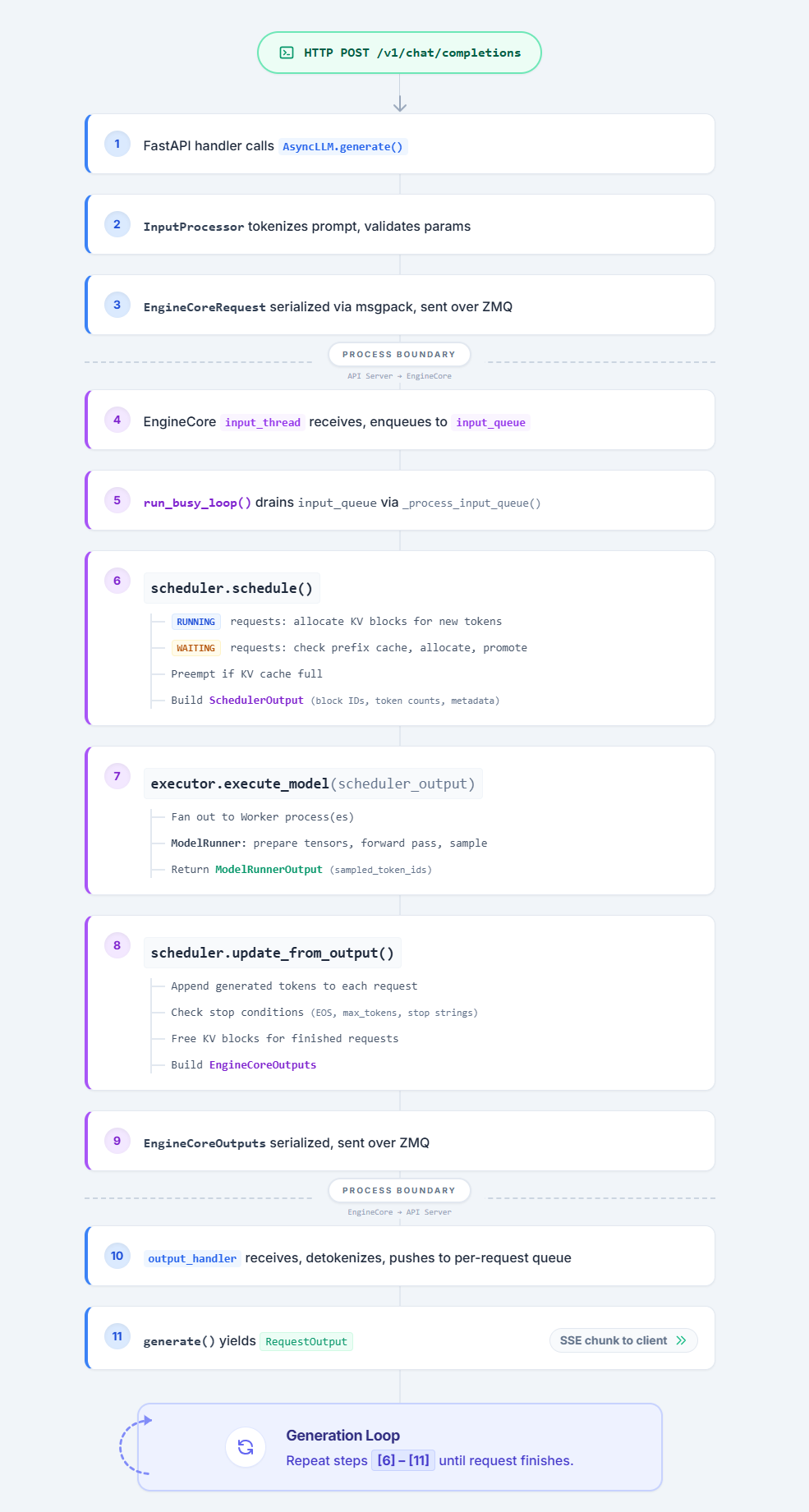
Summary: Complete Request Flow
Key Takeaways for Tuning
-
The token budget is the throughput lever.
--max-num-batched-tokens
controls how many tokens the scheduler packs into each GPU step. Higher
values = bigger batches and better GPU utilization, but more memory
pressure and higher per-request latency. -
KV cache size determines concurrency. The number of blocks (controlled
by--gpu-memory-utilization) sets the upper bound on how many requests
can be in-flight. When blocks run out, new requests queue and running
requests may be preempted. -
Prefix caching is free throughput. When enabled, shared prompt prefixes
(system prompts, few-shot examples) are computed once and reused, directly
reducing prefill work. -
Chunked prefill protects decode latency. Without it, a single long
prompt can monopolize the entire token budget for multiple steps, starving
decode-phase requests.--enable-chunked-prefillwith a sensible
--long-prefill-token-thresholdkeeps decode latency bounded. -
The process boundary is intentional. The ZMQ separation between API
server and EngineCore means the GIL never blocks GPU execution. Background
I/O threads overlap serialization with the forward pass — Python overhead
in the API server does not affect GPU throughput.
All source files referenced
vllm/v1/engine/core.py— EngineCore, EngineCoreProc, step(), run_busy_loop()vllm/v1/core/sched/scheduler.py— Scheduler, schedule(), update_from_output()vllm/v1/worker/gpu_model_runner.py— GPUModelRunnervllm/v1/core/kv_cache_manager.py— KVCacheManager, allocate_slots(), get_computed_blocks()vllm/v1/core/sched/output.py— SchedulerOutput, NewRequestData, CachedRequestDatavllm/v1/engine/async_llm.py— AsyncLLM, generate(), output_handlervllm/v1/engine/input_processor.py— InputProcessorvllm/v1/engine/core_client.py— EngineCoreClient (ZMQ communication)vllm/v1/outputs.py— ModelRunnerOutputvllm/v1/request.py— Requestvllm/entrypoints/openai/api_server.py— HTTP entry pointvllm/v1/worker/gpu_worker.py— determine_available_memory()vllm/v1/worker/utils.py— request_memory(), bind_kv_cache()vllm/v1/core/kv_cache_utils.py— get_kv_cache_configs(), get_kv_cache_config_from_groups()vllm/model_executor/models/qwen3_5.py— Qwen3_5ForCausalLM, Qwen3_5Modelvllm/model_executor/models/qwen3_next.py— Qwen3NextModel, Qwen3NextDecoderLayervllm/model_executor/models/registry.py— ModelRegistry
Extras resources
The vLLM tech blog is very well written; I recommend this article as a complement to my vLLM guide: Inside vLLM: Anatomy of a High-Throughput LLM Inference System
Thanks
Thanks to read this guide, I really hope it will help you understand how LLMs work in production and how to use vLLM in depth!
You can follow me on my Hugging Face profile or join the conversation on the vLLM Slack community @BLANC Swan.